Compare products side by side
Put up to three eMAG products from your watchlist next to each other: who is cheapest, best placed and best rated today, and how their price, position, reviews and rating moved.
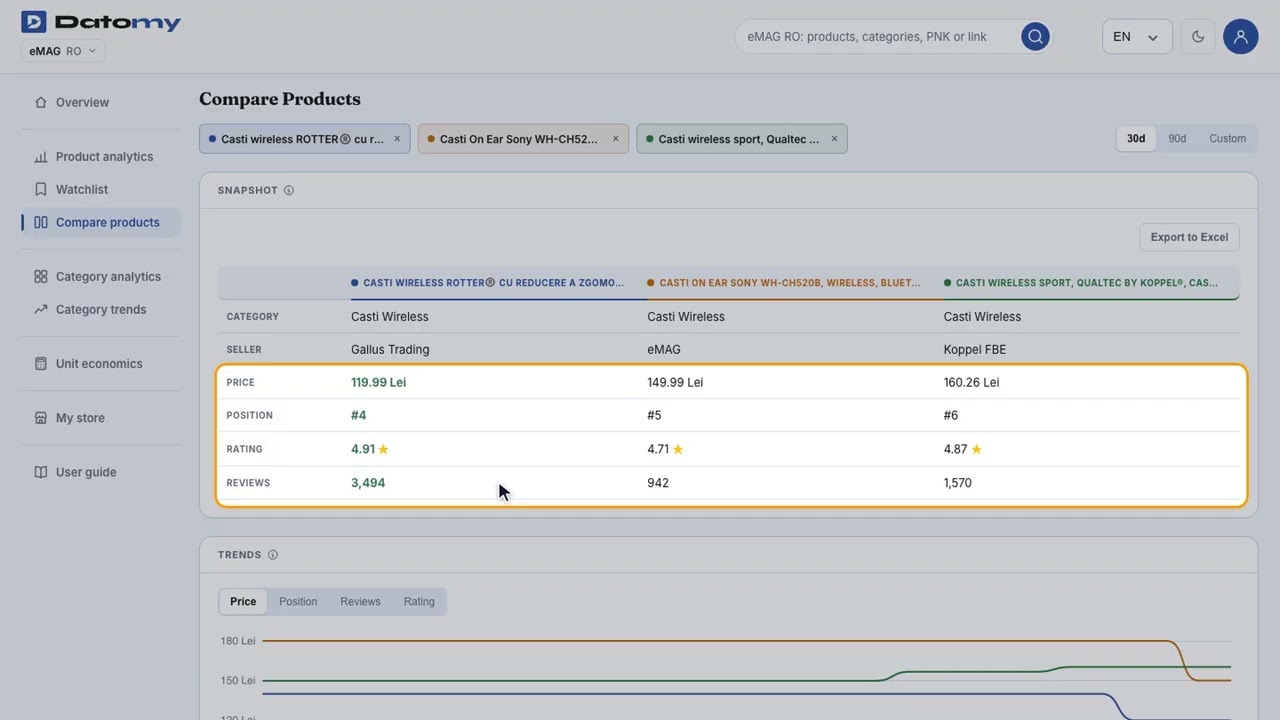
Compare products puts up to three products side by side. It is the quickest way to see how you stand against your competitors: today in one table, and over time on one chart, each product in a colour of its own.
Choosing the products
The comparison draws from your watchlist, so save the products you want to compare there first. Two is the fewest it can compare.
The fastest start is the button that fills the comparison from your watchlist: Compare your 3 saved products, or Compare the first 3 from your watchlist when the list holds more.
Each product then sits in a chip at the top. The cross on a chip takes it out, and + Add product lists the products on your watchlist that are not in the comparison yet. To bring in a product that is not on your watchlist, open it, press Save, and come back. Pick rivals at a similar price: a comparison is most useful between products a buyer would actually choose between.
The snapshot
Snapshot lines the products up as Datomy last recorded them: the Category, the Seller, the Price, the Position, the Rating and the Reviews.
The best value in each row is shown in green: the lowest price, the best position (the lowest number), the highest rating and the most reviews. One look tells you who wins on what. A product that is cheapest but far down the listing, or best rated with few reviews, is worth a second look.
Export to Excel takes the snapshot with you, the products as columns, as on the screen.
The trends
Below the snapshot, all the products share one chart, with a tab per metric:
- Price: who changed prices, and when. Campaign cuts show up as steps on the same days.
- Position: who climbed and who slipped in the category listing. #1 is at the top of the chart, so a line near the top belongs to a product buyers see first.
- Reviews: whose sales grow fastest. eMAG publishes no sales, but buyers leave reviews as they buy, so the steeper the line, the more buyers. A flat line means few sales, whatever the price.
- Rating: who keeps buyers happiest. A rating falling behind the others is worth reading the product's reviews for.
The period is 30d, 90d or your own dates under Custom, as on every chart in the eMAG section.
Reading it as a seller
Price alone rarely explains a gap. Look at the four together: a competitor that is not cheaper but gains reviews faster is winning on something other than price. When one of them moves, the product page of that product shows its stock and every detail of its listing.