The watchlist and price alerts
Keep the eMAG products you follow in one list, yours and your competitors', and give each a target price that is marked the moment the market crosses it.
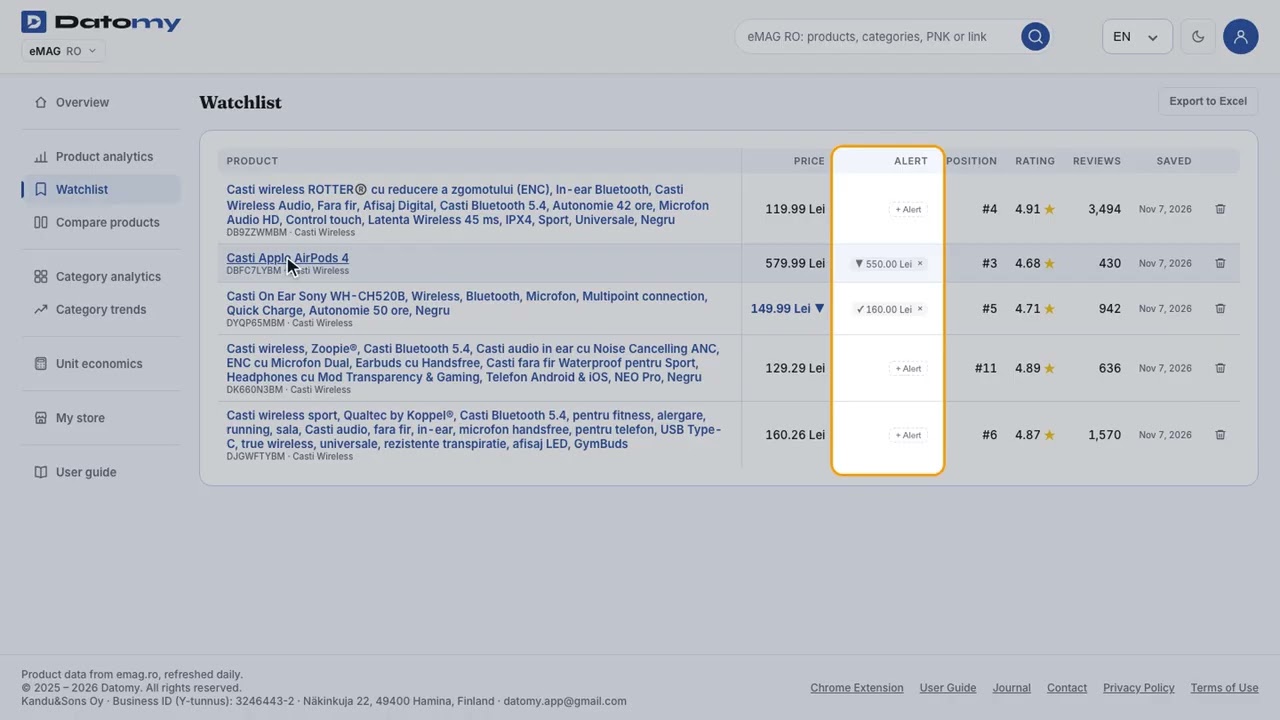
The Watchlist keeps the products you follow in one place: your own and your competitors'. Each row is today's picture of one product, and each can carry a price alert, so a glance tells you whether anything you care about has moved.
What is on the list
Every product you save with Save on its product page lands here, newest first. The list holds up to five products; to add a sixth, remove one first.
For each product the columns show:
- Product: the name, with its PNK and category under it. Click the name to open the product's full analytics.
- Price: the latest price Datomy recorded.
- Alert: the target price you set, if any.
- Position: its place in the category listing, where #1 is the top.
- Rating and Reviews.
- Saved: when you added it.
Click a column's heading to sort the list by it, and again to reverse the order.
Price alerts
An alert is a target price for one product. It is where the watchlist earns its keep: instead of opening every product to check its price, you see at once which ones have reached the price you were waiting for.
To set one, press + Alert in the product's row, type the target price and press Enter. The direction is chosen for you from the price as it stands:
- a target below today's price waits for the price to fall to it or lower, and is marked ▼;
- a target above today's price waits for the price to rise to it or higher, and is marked ▲.
When the price crosses the target, the price in the row is highlighted with the arrow beside it, and the alert shows a tick. Reached alerts are also listed on the Overview under Price alerts reached, so you see them as soon as you open Datomy.
A few ways to use them:
- Set a target just under your own price on a competitor's product, and you will see at once when they undercut you.
- Set one on a product you plan to buy for resale, and wait for the price you want.
- Set one above today's price on your own product, to see when the market lets it rise.
Removing and exporting
The cross next to an alert removes the alert. The bin at the end of a row takes the product off the list.
Export to Excel takes the whole list with you: the name with a link to the product, the PNK, category, seller, price and currency, position, rating, reviews and the day you saved it.
Where else the list is used
The watchlist is what Compare products draws from, and the Overview shows how each product on it changed over the last seven days.