The panel on eMAG listings
The Datomy panel on an eMAG category, brand or search page: the summary strip, the Overview charts and the Products table, free, and the Competition, Category and Map tabs of eMAG Pro.
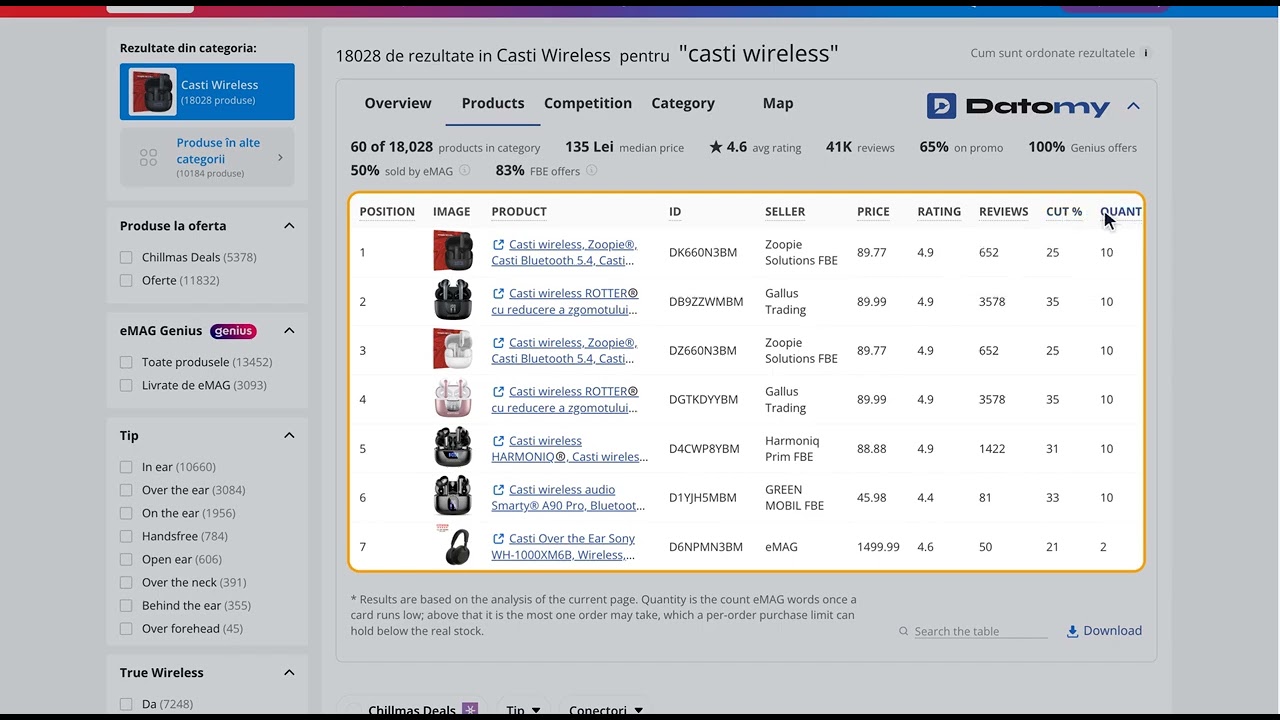
On every eMAG listing (a category, a brand, a seller's store or a search) the Datomy panel analyses the products on the page. The video uses a search for wireless headphones.
The summary strip
The strip at the top sums the page up: how many products the category holds, their median price, the average rating, the reviews and how many are on promotion. Then how many are sold by eMAG itself, and how many are fulfilled by eMAG.
Overview
How the products on the page spread out. Price counts the products in each price range; switch it to Reviews and the same ranges are weighed by their reviews, a sign of where buyers actually buy. Price cuts shows how far prices sit below eMAG's reference price, and Rating and Reviews complete the picture. Point at a bar for its numbers.
Every chart has an ⓘ that explains what it counts, and a button that saves it as an image.
Products
The page as a table: position, product, seller, price, rating, reviews and the price cut, then, further right, how many offers each card has, whether it is a Genius offer and whether eMAG fulfils it. On a smaller screen scroll the table sideways for those. Point at a column's title to see what it means.
- Click a column to sort by it. By reviews, the page's bestsellers come first.
- A product's name opens its page on eMAG.
- Search the table by any word: a brand, a seller or a product code.
- Download saves the table as an Excel file.
The charts and the table work together: click a price range on Overview and Products opens with just those products.
Overview and Products are free, with or without an account.
Competition, Category and Map (eMAG Pro)
Competition shows who you are up against. Sellers: which sellers hold the page, and how many products each. Offer competition: on how many product cards one seller is alone, and on how many several fight for the Buy Box. Badges: the labels eMAG puts on the cards. Genius: how many offers are in eMAG's Genius programme.
Category looks past the page, at the whole category as eMAG counts it: its Brands, Price ranges, Availability (in stock, new or resealed) and Attributes, eMAG's own filters, with a list to pick which one. The note under each tab says what its numbers are based on: the whole category here, the current page on the other tabs.
Map puts every product on the page on one chart: price across, reviews up, and the colour for the rating. Cheap products with many reviews sit top left, where competition is fiercest. A gap on the map is a price range nobody serves well.