The panel on an eMAG product page
The Datomy panel on an eMAG product page: every offer on the card, the profit calculator, the reviews and their pace, the variants, and the sponsored products eMAG shows beside it.
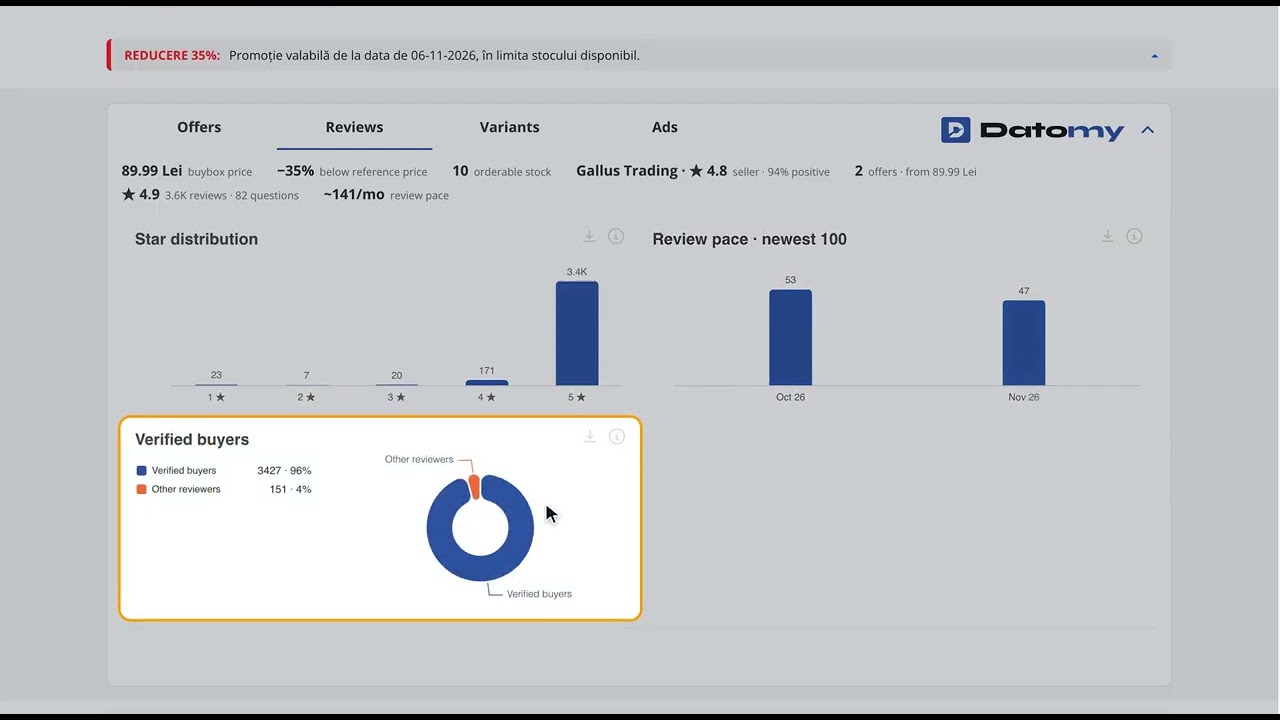
On a product page Datomy analyses that one product. The panel sits below the product's photos, and the Datomy button in the corner of the page takes you straight to it. The product-page panel is part of eMAG Pro.
The summary strip
The offer at a glance: the Buy Box price and how far it sits below eMAG's reference price, the stock you can order, the seller behind the Buy Box with their rating, and how many offers the card has. Then the rating, the reviews and the review pace: how many reviews arrive a month, the closest thing there is to the product's sales.
Offers
Every seller on this product card, the Buy Box first: the price and how far it is from the Buy Box, the seller's rating, availability and stock, and whether the offer is Genius or fulfilled by eMAG. Download saves the table.
Calculate profit opens Datomy's unit economics calculator on this product's price and category, ready for your own costs. It is there when your plan includes the Datomy site.
Reviews
What buyers wrote, three ways:
- Star distribution: how many reviews give each rating.
- Review pace: the newest hundred reviews, month by month. A rising pace means a product that is selling more.
- Verified buyers: how many reviews come from people who bought the product on eMAG.
Variants
The product's options, its colours or sizes, with the price and availability of each. The tick marks the one on screen.
Ads
The sponsored products eMAG shows on this page, slot by slot: who advertises next to this product, which seller and at what price. Scroll the table sideways for each one's rating and reviews, its offers, and whether it is Genius or fulfilled by eMAG. Sponsored places are personalised and rotate, so another visit may show others; the note under the tab says so.