Costs: what your goods cost
Tell Datomy what your goods and their delivery cost you, one by one or pasted from a spreadsheet, and every screen of your store can show a real profit.
Costs is where you tell Datomy what your goods cost. It is the one number Trendyol does not know, and the one that turns revenue into profit: until it is entered, no screen shows a profit at all. It is the second tab of My products in the sidebar, after Catalogue.
How much is covered
The card at the top, How much of your money has a cost behind it, is the share of what you sold whose cost is known. It is counted by revenue rather than by product, because a handful of products usually carry most of the money: price those first and the profit on every other screen can be trusted.
Packaging and delivery
Packaging and delivery, per unit is what it costs you to get one unit out of the door: the box, the labels, the packing, and the courier if you pay one yourself. It is one number, multiplied by every unit you ship, including the ones that come back, and it applies to every store on your account.
Leave out the shipping Trendyol bills you. That is already taken off, and when Trendyol billed the store for shipping in the period the card tells you how much, so you do not count the same delivery twice. Anything you pay by the month, like a courier's fixed fee, is an expense instead.
The products list
Below, What your goods cost lists every product you sell, the biggest earners of the period first, with Items sold, Revenue, Cost per unit and a Delivery column per country. A row is a barcode: a cost does not change from country to country, so the countries are not split here. Only without a cost shows what is still missing.
Setting a cost
Click Set a cost, type what one unit costs you and save. It is the price of one unit in the currency on screen: what you paid your supplier, plus anything it took to get the goods to your shelf.
The first cost you enter covers everything already sold, so every period you have looked at gets its profit at once and the coverage at the top moves.
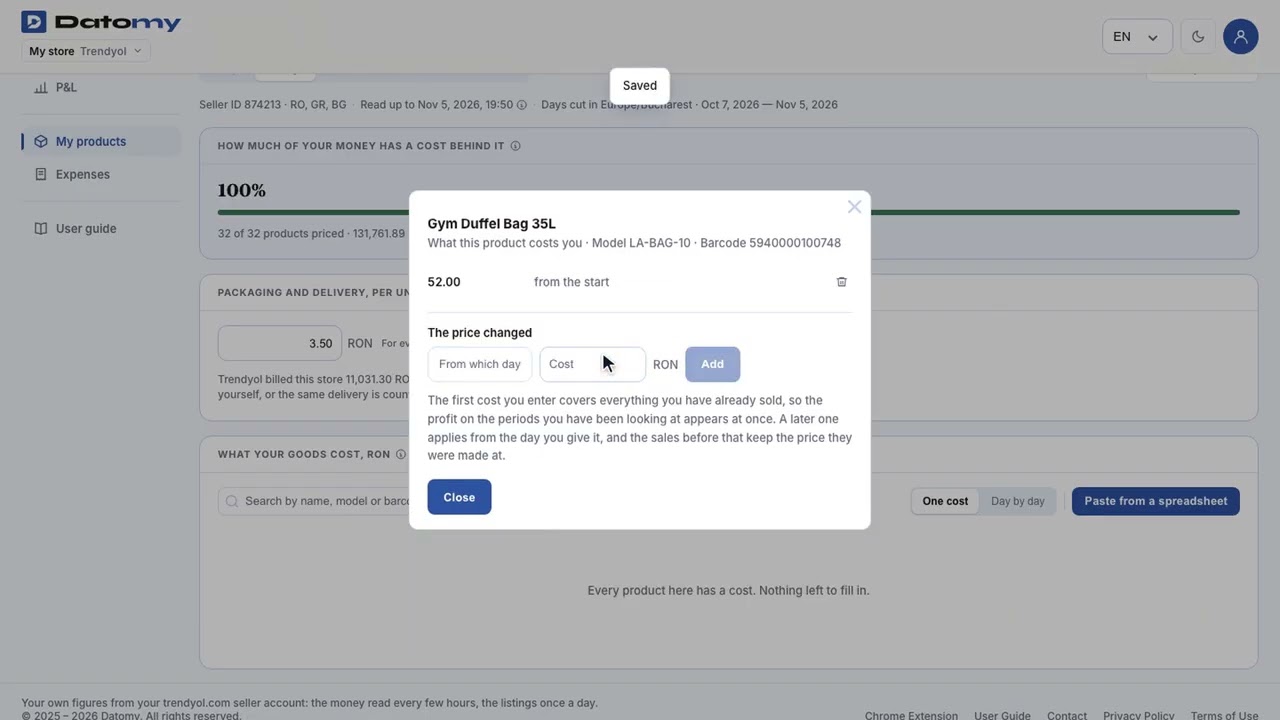
When a price changes
When a supplier changes the price, open the product's cost again, and under The price changed pick From which day and the new cost. The sales before that day keep the old cost, and the window lists every price with its dates. A cost can also have an end, for a batch that was dearer for one week; by default it runs until further notice. For a model with several sizes, one switch applies the same cost to every barcode of the model.
Day by day shows which cost was in effect on each day of the period, so you can check that a change landed where you meant it to. The day a cost started stands out, and clicking a day opens the window on it.
Pasting many costs
Paste from a spreadsheet takes two columns: a code and a cost. The code is a barcode, or a model code, which prices every barcode of the model in one line. Both 40,50 and 40.50 are understood. Before saving, the window shows what it read and counts the lines it skipped, so check the first few pairs. The number is chooses whether the column is the cost of the goods or the delivery to one country.
Delivery per product
If one product costs more to send, a bulky one for instance, click its Delivery cell for a country and give it its own figure. It replaces the general one for that product in that country.