The dashboard of your Trendyol store
The first screen of your store answers three questions at a glance: what buyers ordered, what that left you in money, and what needs your attention now.
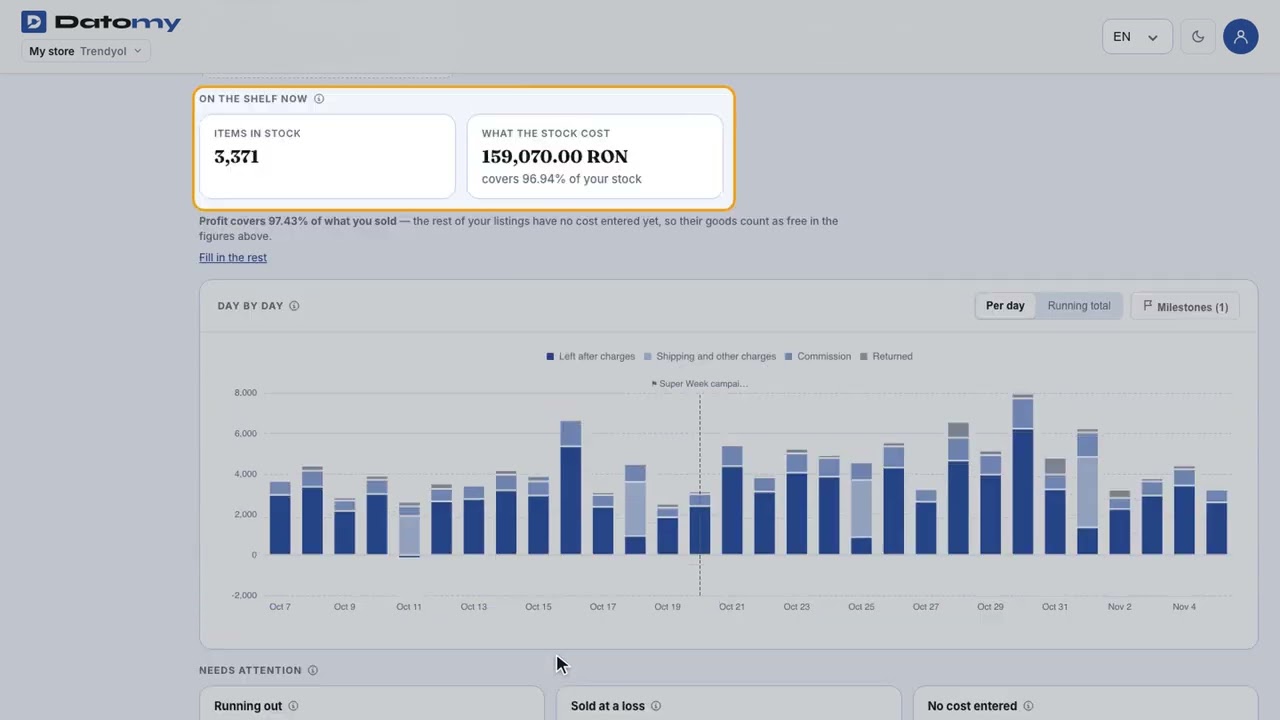
The Dashboard is where your store opens. It answers three questions at a glance: what did buyers order, what did that leave you in money, and what needs your attention right now.
Period and currency
Every figure on the screen is about one period. Pick 7 days, 30 days, This month, Last month or Custom, and everything follows. Each card compares itself with the same length of time just before: green means it moved the right way, red means it did not.
Trendyol pays each country in its own currency, Romania in lei, Greece and Bulgaria in euro. Datomy never adds two currencies together: you switch between them with Currency.
The line under the title names the seller account and its countries, when Datomy last read your money (Read up to), and the time zone your days are cut in.
Orders placed
The first row is about the orders placed in the period, in the currency the buyers paid in. Ordered is the value of everything ordered, with the number of orders and items under it. Cancelled is the share of ordered items that were cancelled, Bought out the share delivered and kept. Average order is what one order, and one item, is worth. On the way counts what is ordered but not yet delivered or cancelled. All orders opens the Orders tab.
How much moved counts what Trendyol actually settled: items sold, items returned (also as a share of items sold) and the average sale. A sale is settled after delivery, so these figures follow the orders by a few days.
The money, as a chain
Read The money as a chain. It starts with Sold, and every card after it is a slice taken off: Returns, Commission, Shipping, Penalties and Other charges, each with its share of sales. The shaded card, Left after charges, is what Trendyol leaves you once all its fees are out.
A magnifier on a card shows what it is made of: sales, returns and commission by country, and the charges exactly as Trendyol billed them, under the labels on the invoices in your Trendyol panel.
Your costs is what you told Datomy your goods and packaging cost, the one figure Trendyol does not know. Take it off and you get Profit: what stays with you before overheads and tax. If some products have no cost yet, a note says what share of your sales the profit covers, and Fill in the rest opens Costs.
Ad top-ups has a dashed border and sits outside the chain. A top-up is money moved onto your advertising balance, not this period's spend, so it is not taken off.
On the shelf now shows the items in your warehouse as of the last catalogue read, and what that stock cost you.
Day by day
The chart shows the same money per day: each bar is the day's sales cut into what was left, Trendyol's charges, the commission and the returns. A day below zero took more than it sold, often the day a shipping invoice landed rather than a bad day of sales. Running total shows the period adding up.
Milestones are your own notes on a day: a price change, a campaign, ads switched on. Press Milestones, then Add a milestone, pick the day and write what happened. They appear as flags on the chart, and only you see them.
Needs attention
At the bottom, short lists to start from, each linking to the screen where you can act:
- Running out: fewer than 14 days of stock at the pace of the last 30 days.
- Sold at a loss: below zero once Trendyol's share and your own costs are out.
- No cost entered: what sold without a cost, so no profit can be shown for it.
- Often cancelled and Often returned: at least twice the store's own rate, among products with 10 or more orders.
- Risers and fallers: the biggest moves in sales against the period before.
A list with nothing in it is not shown at all.