Finance: every Trendyol payout explained
The money Trendyol actually paid you, payout by payout, each one rebuilt line by line from Trendyol's own records, with what your goods cost taken off.
Finance is the money Trendyol actually paid you, payout by payout, and why each payout is the amount it is. At the top are the same controls as on the dashboard: the period and the Currency.
Payouts
The Payouts card lists every payout Trendyol sent in the period. The chart above the table shows each one as a bar: Paid is what reached your bank. Where every sale in the period's payouts has a cost entered, a line shows Left after goods, what remained once your goods and packaging are paid for. Point at a bar to see both figures; the gap between the bar and the line is what your goods cost.
Below the chart, every payout is a row: the day it was Paid, its number as Trendyol knows it (Payout), how many Items it settled, what was Sold and Returned, the Commission, the other Charges, and what it Paid you. The last two columns, Your costs and Left after goods, take off what those items cost you. They are filled in only when every item in the payout has a cost: otherwise you see a dash, because a guess would read as the payout's profit.
A payout's statement
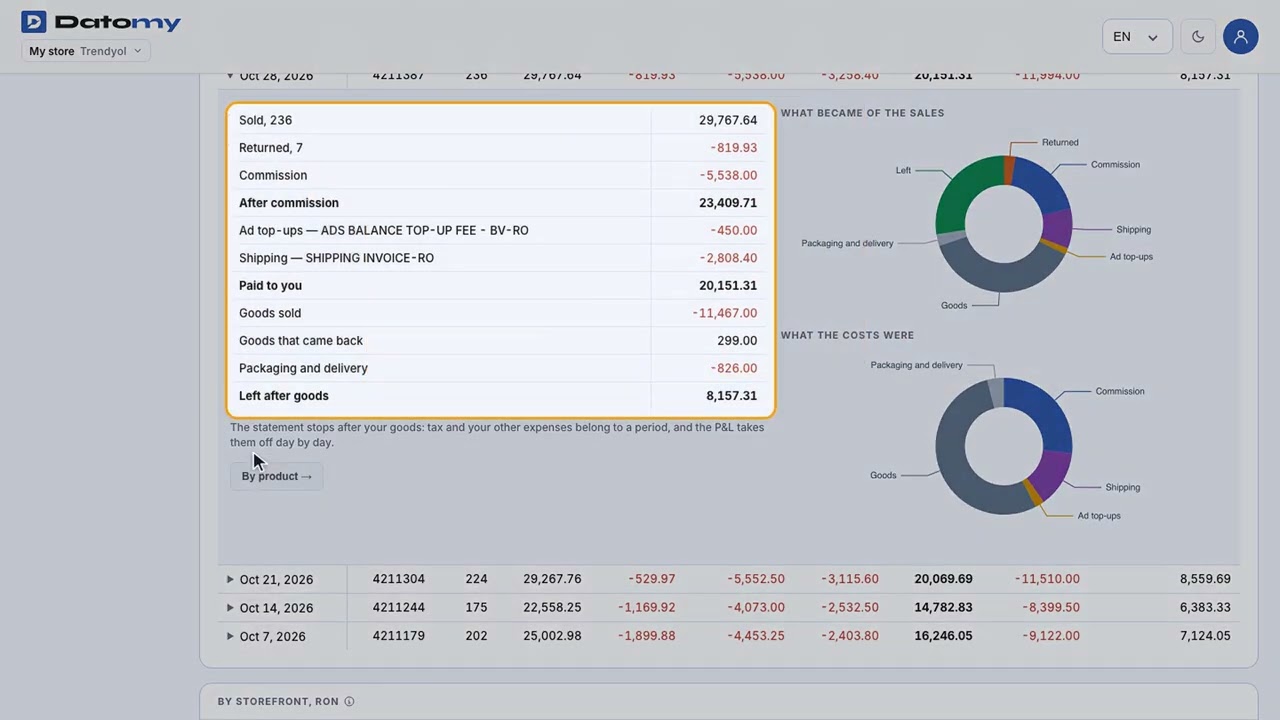
Click the date of a payout to open its statement. It rebuilds the payout from Trendyol's own records, line by line, down to Paid to you:
- what was sold and what was returned, with the number of items;
- the Commission, and what was left After commission;
- every charge under the very label Trendyol puts on its invoice, so you can find it in your Trendyol panel;
- Paid to you, the amount your bank received.
Then your own costs: Goods sold, Goods that came back to your shelf, and Packaging and delivery. What remains, Left after goods, is what this payout really left you. If only part of the payout has a cost entered, a note says what share is covered.
One exception: your store's first payouts in Datomy may also settle sales made before the store was first read. Then a line, Not explained by the rows we hold, carries the difference, and the statement stops at what was paid, because what those older goods cost cannot be worked out.
Beside the statement, two charts. What became of the sales splits what you sold into returns, commission, shipping and other charges, your goods, and what was left. What the costs were shows which cost weighs most.
The statement stops after your goods on purpose. Rent, salaries and tax belong to a period rather than to a payout, so the P&L takes them off, day by day.
By product opens the payout's sales and returns by barcode, so you can see which products the money came from. Trendyol's invoices name no product, so shipping and the other charges are not in that list. Click the payout again to close it.
The period
Under the payouts, two tables cover the period on screen, the same figures as the dashboard's cards.
By storefront splits the period by country. Each currency shows its own countries: in lei that is Romania, and switching to euro shows Greece and Bulgaria.
Day by day is the same money for every day: sold, returned, commission, shipping, penalties and other charges, what was left after them and, where costs are entered, your goods, packaging and profit. A day with a shipping invoice on it stands out. Only days with movement hides the empty days. The table shows 20 days a page; choose 50 or 100 under it to see more at once, and the total for the whole period is at the bottom.
As on the dashboard, ad top-ups are not taken off. If there were any, a note under the table gives the amount: a top-up is a prepayment onto your ad balance, not this period's spend.