Geography: where your orders go
Your orders by region and city: how many items went where, how many of them buyers kept, and which places send parcels back.
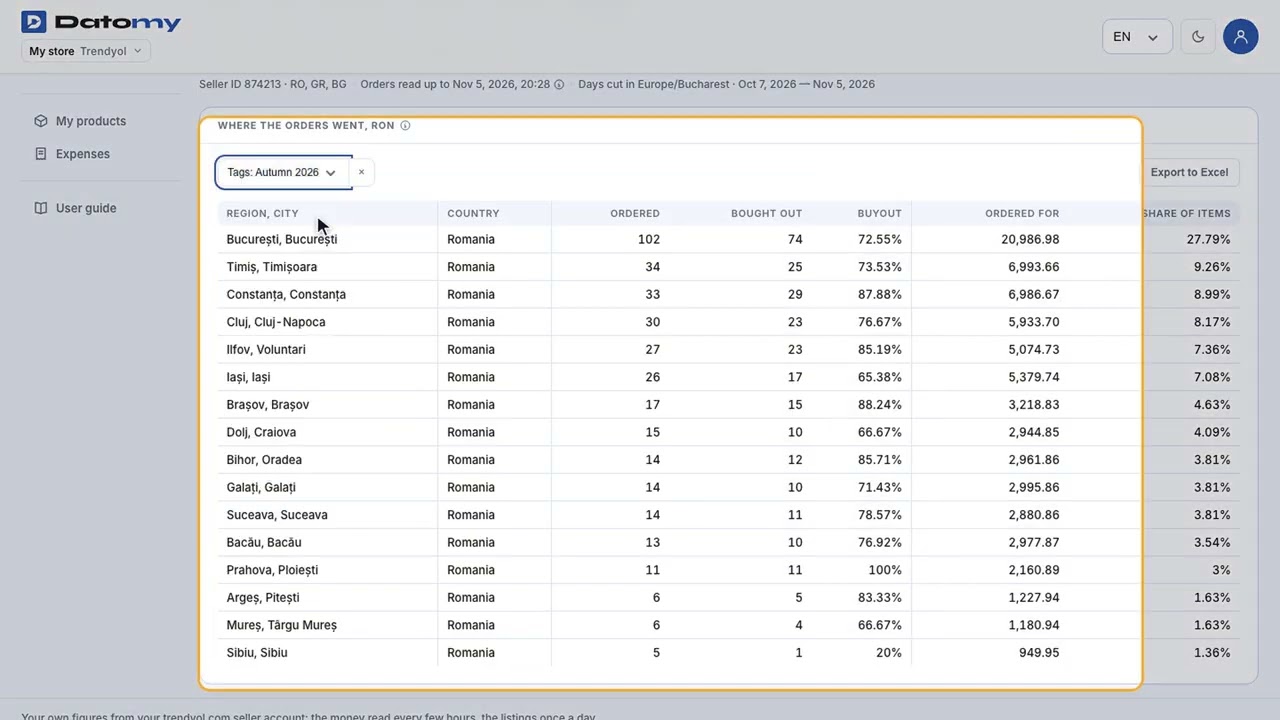
Geography shows where your orders go: every region and city your items were sent to in the period, and how many of them buyers kept. You find it in the sidebar under Orders & sales, on the Geography tab.
Reading the table
Each row is a place, written Region, city, with its Country beside it. Then:
- Ordered: the items ordered from there in the period.
- Bought out: the items delivered and kept, that is, delivered and not returned.
- Buyout: bought out as a share of the items ordered.
- Ordered for: what those items were ordered for, after your discounts.
- Share of items: the place's share of all the items in the table.
The rows come by the day the order was placed, and orders are read from Trendyol every hour. Buyout counts every item ordered in the period, including the ones still on their way. For a period that ends today it rises over the following days as parcels are delivered, so compare places within one period rather than a recent week against an old one.
Comparing places
The first rows usually belong to the largest cities, and that alone tells you little. The useful column is Buyout. Where far fewer parcels are kept than elsewhere, look at the delivery times to that region and at cash on delivery, which buyers find easy to refuse at the door. The Orders tab shows why items were cancelled or returned.
Datomy keeps nothing finer than the region and the city. Trendyol sends each order with the buyer's name and address; Datomy discards them as they arrive, so there are no addresses and no buyers here.
Tags and currency
The Tags filter narrows the table to a group of products, for example a collection, to see where it sells best. Tags you tick stay ticked as you move between the screens that have the filter.
Each table is in one currency, the one the orders were paid in, and nothing is converted. Countries that share a currency share one table, so to see where your orders in another currency went, change the currency at the top of the screen.
Export to Excel saves the whole table, every page of it.