Orders: what buyers ordered and what became of it
The Orders tab counts everything buyers ordered by the day they ordered it, and follows each item to delivery, cancellation or return.
Orders is the first tab of Orders & sales in your store's menu. It shows everything buyers ordered in the period, and what has become of each item since.
Orders and sales are two different days
Orders are counted by the day they were placed. The Sales tab next to it counts a sale on the day Trendyol settles it, after delivery. That is why the two tabs never show the same figure for the same day.
An order belongs to the day it was placed. When an order from last week is delivered today, last week's figures change, so the latest days keep moving for a while. Datomy reads your orders every hour; the line under the title says when it last did (Orders read up to). Amounts are in the currency the buyers paid in.
The cards
The cards at the top are the ones from the dashboard: Ordered, Cancelled, Bought out, Average order and On the way. Each compares itself with the same length of time just before. Your order history starts where Datomy's first read of the store began, about ten weeks back, and a note says so when the period reaches further.
When and why
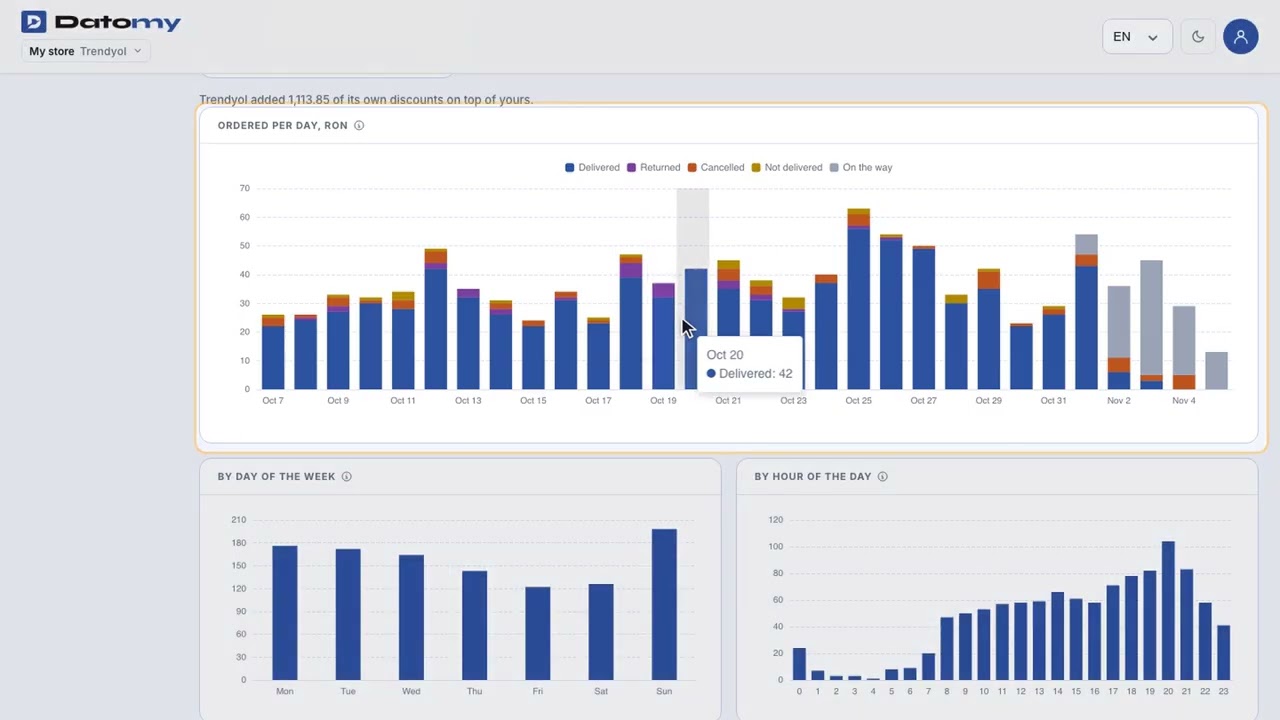
Ordered per day shows the items ordered each day, split by what became of them: Delivered, Returned, Cancelled, Not delivered and On the way. Point at a day for its figures. The last few days are mostly still on the way.
By day of the week and By hour of the day show when your buyers order, in your own time zone. Worth knowing when you plan a campaign or a price change.
Why orders were cancelled and Why items came back list Trendyol's reasons in plain words, with how many items each one covers and, for a cancellation, who cancelled it. Out of stock cancelled by you means orders you had to cancel because the item had run out.
Ordered by product
Ordered by product breaks the period down by product, one line per country: Items ordered, what they were Ordered for, how many were Cancelled, the share Bought out, and how many Returned. Click a column heading to rank the list by it, largest first; ranked by cancellations, the products with a stock or listing problem come to the top.
The Tags you give your products work as a filter here. Tags narrow the two tables, not the charts above them, because one order can hold products with different tags.
Ordered items
Ordered items lists every item ordered, newest first, one line per item: when it was ordered, the order number, the product, its country and status, its price, what it cost you, the region and city it went to, and how it was paid. A cancelled or returned item also shows the reason. There is no buyer here: Datomy does not keep buyers' names or addresses.
- Search by product, barcode or order number.
- Narrow by Status, and by Country where the currency covers more than one.
- Export to Excel downloads every item that matches your filters, not only the page on screen, with Trendyol's own discount on each item as an extra column.
The table shows 20 rows a page; choose 50 or 100 under it to see more.