Profit and loss (P&L)
Your profit and loss month by month, from sales down to net profit, with your own costs, your expenses and an estimate of your tax.
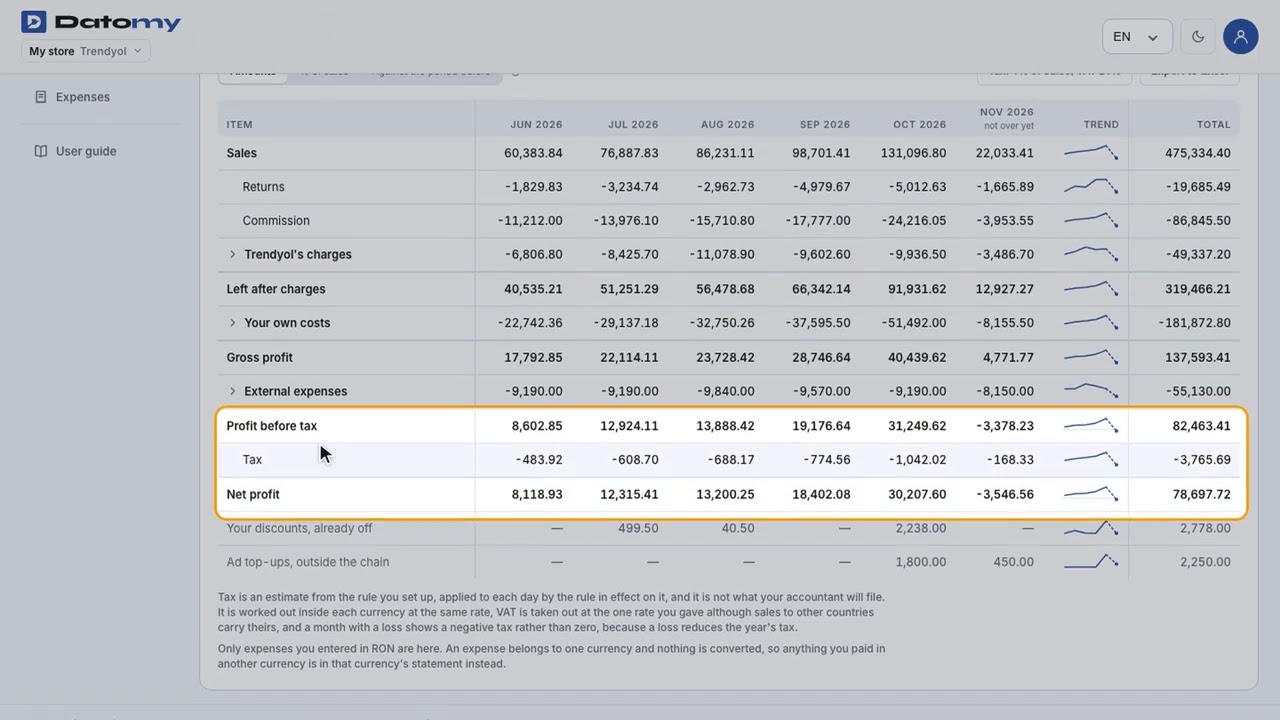
The P&L is your profit and loss, period by period. It is the same money as the Finance screen, read down instead of across, and it goes further: past Trendyol's charges to your own costs, your expenses, tax and net profit. Open P&L in the sidebar.
Columns
With By month the columns are the last six months, oldest on the left. The last one is the current month, marked not over yet. Then come Trend, the shape of each row across the columns, and Total. By week cuts the same statement into the last eight weeks, so you can follow the current month as it goes rather than wait for it to end.
Every figure is in one currency. If your store is paid in two, each has its own statement and nothing is converted.
Reading from the top
- Sales, less Returns and Commission, less Trendyol's charges, gives Left after charges.
- Less Your own costs, the goods and the packaging, gives Gross profit.
- Less External expenses gives Profit before tax.
- Less Tax gives Net profit: what the business really earned.
A row with an arrow opens to show what it is made of. Trendyol's charges splits into Shipping, Penalties and Other charges; External expenses splits by category.
Your own costs come from the Costs tab. Until you enter any, the profit rows are not shown, because a profit without the cost of the goods would claim they were free. External expenses are what you paid outside Trendyol, such as rent, wages or the accountant. You enter them on the Expenses screen and they land here in their month. If your account holds more than one store, they are not taken off either store's profit, and a note under the table says so.
Why a month can be negative
Rent and wages are often paid at the start of a month, while only a few days of sales are in. That is why the unfinished month is marked: a negative figure there is not yet a bad month.
The tax rule
Press Set up tax above the table. A rule has a start date, a base, a rate and the VAT included in your prices. The base is either Sales less returns, without VAT or Profit before tax, without VAT. Once saved, the button shows the rule, for example "Tax: 3% of sales, VAT 21%".
When your rate changes, add a new rule from the date it changed. Earlier rules go on applying to the days before it, so past months do not move. The tax here is an estimate from your rule, not what your accountant will file, and the note under the table says what it simplifies.
Three views of one statement
The switch above the table chooses what each cell shows:
- Amounts: the statement itself, every deduction with its minus.
- % of sales: every row as a share of that column's sales, the structure of your margin at a glance.
- Against the period before: how each figure moved from the column to its left. Green is good news and red is not, so a charge going down is green. The unfinished period shows no move, because part of a month against a whole one is not a comparison.
Below the chain
Two rows at the bottom are not subtracted. Your discounts, already off are already inside the sales. Ad top-ups, outside the chain are a prepayment into your ad balance rather than the period's spend.
Export to Excel saves the statement with all three views, one sheet each, ready for your accountant.