Sales by product: what Trendyol settled, product by product
The Sales tab shows what Trendyol settled in the period, product by product, with your costs, what each product left you, its margin and its stock.
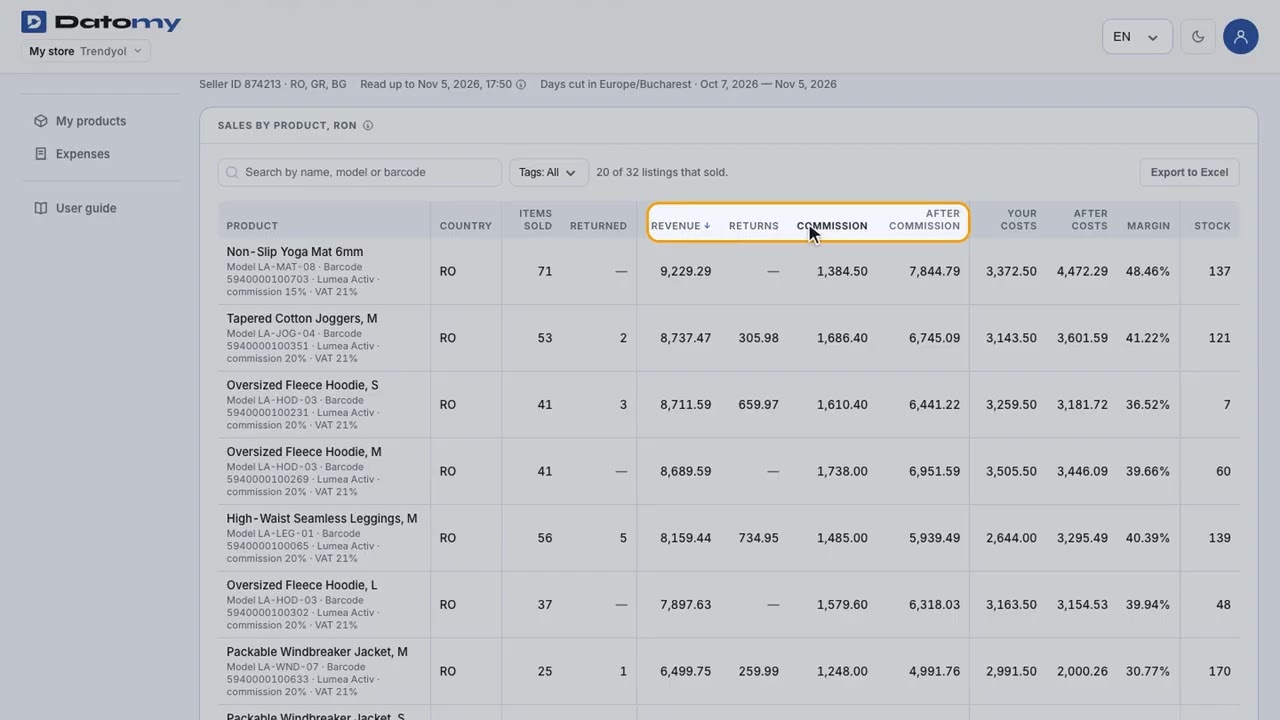
Sales is a tab of Orders & sales in your store's menu. It shows what Trendyol settled in the period, product by product, best first.
Where the Orders tab follows what buyers ordered, Sales follows the money. A sale lands here once Trendyol has settled it, which happens after delivery.
What a row is
Each row is one product on one storefront. A product you sell in Romania and in Greece is two separate listings on Trendyol, each with its own name, price and rates, so it is two rows here, with the Country column telling them apart.
Under the name you find the model code and the barcode, the brand, and the commission and VAT of that listing. Names and rates come from your Trendyol listings, read once a day, so a change you made this morning may still show yesterday's.
Items and money
Items sold and Returned count the records Trendyol settled. Trendyol states no quantity on them, so two of the same item on one order line count as one: read them as items rather than pieces.
Then the money: Revenue, Returns, Trendyol's Commission, and what is left After commission. The four add up: revenue less returns less commission is what is left after commission.
Your costs and margin
Your costs is the goods and packaging for the items sold, from what you entered on Costs. After costs is what the product left you, and Margin is that as a share of its revenue. A product with no cost entered shows a dash in these three columns rather than a zero, because a zero would claim the goods were free.
After costs is not yet your profit. Shipping and penalties are billed by the week, never per product, so they cannot be split between products. You find them on the dashboard and in the P&L. Add up this column and you get more than the store's profit, by exactly those charges.
Stock is what your catalogue last reported in your warehouse.
Finding what matters
- Click a column heading to sort by it, and again to reverse the order. Sorted by Margin with the lowest first, the products sold at a loss come to the top.
- Search by name, model or barcode. Searching for a model shows all its sizes, and with Stock beside Items sold you see which size is about to run out while it still sells.
- Tags narrow the list, just as on the Orders tab.
- Switch the Currency to see the countries paid in that currency, for example Greece and Bulgaria in euro. Where one currency covers two countries, a Country filter appears so you can look at one of them alone.
- Export to Excel takes the whole table with you, filtered and sorted as on screen, with the model code and barcode in columns of their own.
The count above the table says how many listings sold, not products: a product sold in three countries is three listings.