The panel on a Trendyol product page
The Datomy panel on a Trendyol product page: everything Trendyol states about the product, every merchant selling it, what the reviews say and where buyers bought it, and its variants.
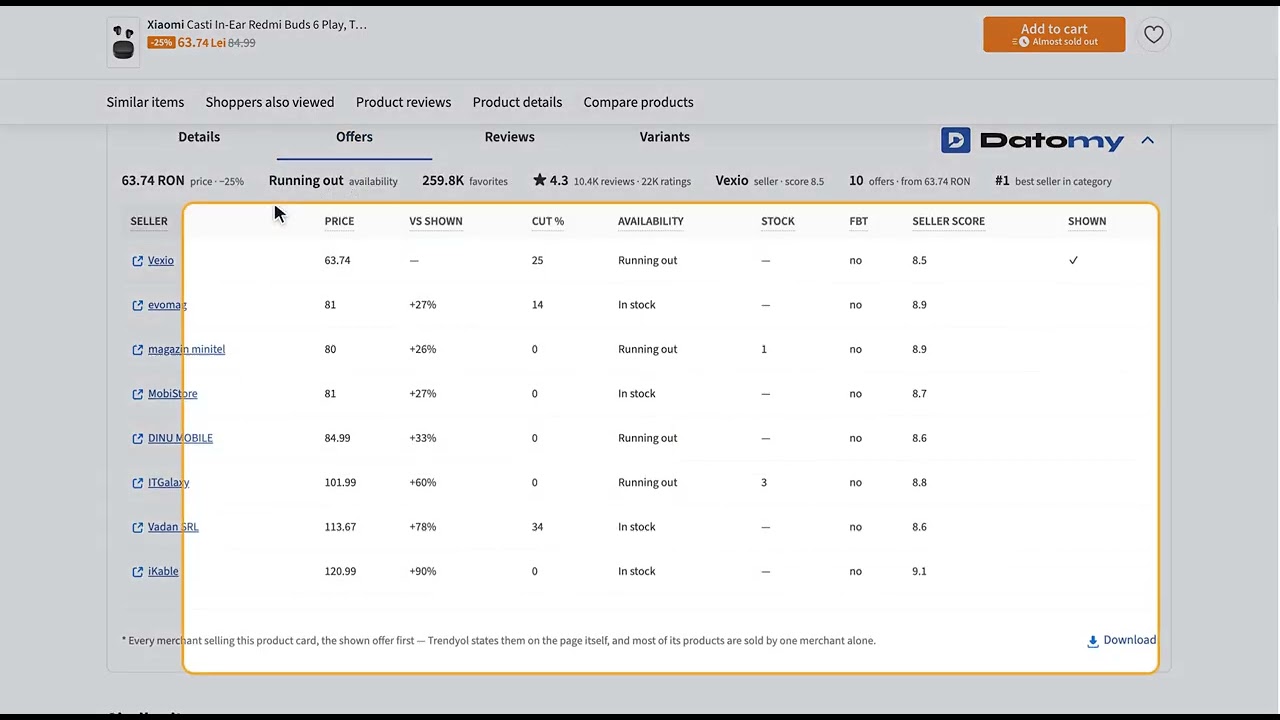
On a Trendyol product page the panel sits below the product, and the Datomy button in the corner takes you to it. The video uses a pair of wireless earbuds on Trendyol Romania.
The summary strip
The product at a glance: its price, its stock, how many shoppers saved it as a favourite, its reviews and ratings, the seller's score, the offers and, where it has one, its rank in the category as a best seller or a favourite.
Details
Everything Trendyol states about the product, in three groups:
- Offer: the seller and their score, the price, and the stock, which Trendyol shows only once it runs low.
- Product: its brand, its category, its ID, and how many of its options are in stock.
- Social proof: favourites, ratings, reviews, and its rank in the category where Trendyol gives one.
Offers
Every merchant selling this product, the one on screen first: the price and how far it is from the shown one, the stock, whether Trendyol fulfils it, and the seller's score.
Reviews
- Star distribution counts the ratings, or the written reviews, at each star.
- Review pace: the newest hundred reviews, month by month. Trendyol pools reviews across its storefronts, so this is the product's pace everywhere.
- What the reviews mention: the topics buyers write about most. Switch to Positive % to see how many of those mentions are good ones.
- Bought from: which sellers the reviewers bought it from.
Variants
The listing's options, with the stock where Trendyol states it and the price of each. The tick marks the one on screen.
That is the whole of the Datomy extension. The course starts again at part 1.